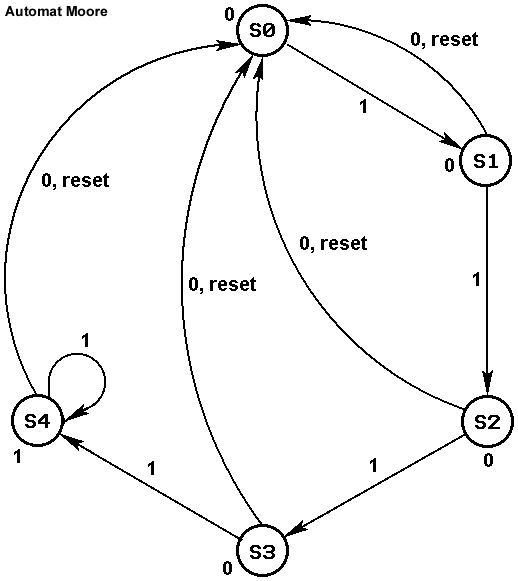
Figure 1. ASM graph for the Four Consecutive One's Counter.
Figure 1. ASM graph for the Four Consecutive One's Counter.
In this design example you will:
dcounter.fsm).
dcounter.vbe).
dcounter.pat).
dcounter.fsm file to the counter.fsm
file, remove the outputs for the states and add the power supplies.
counterm.vbe).
dcounter.pat file to counter.pat, remove
the vectors for the debugging outputs and add the power supplies.
counterl.vst).
counterl.ap).
counterl.cif).
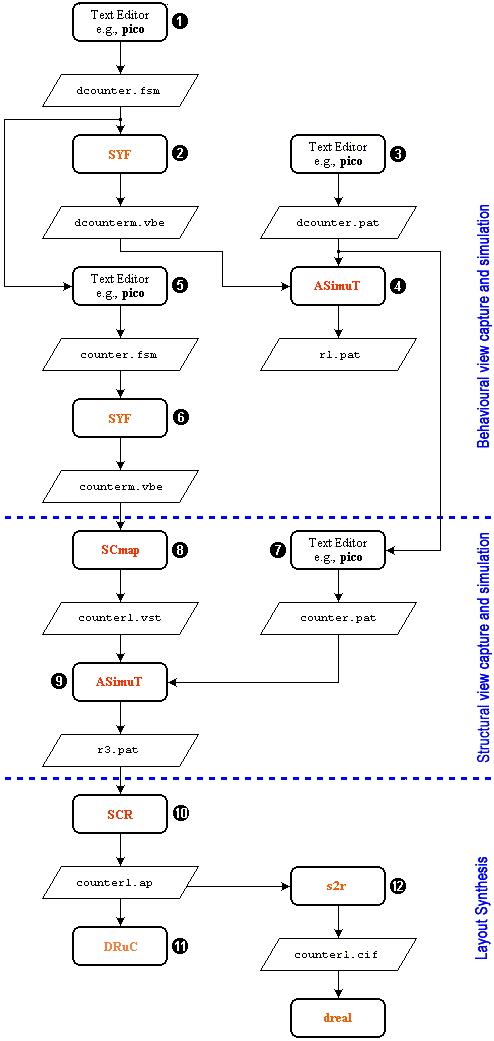
Fig 2. Design flow for the Four Consecutive One's Counter.

|
mkdir Count4Ones
|
Change into this directory:
|
|
cd Count4Ones
|
Create with the text editor a file called dcounter.fsm. Enter the
following and save the file.

|
--***************************************************************************

ENTITY counter IS
  PORT ( ck, i, reset: IN BIT;
         o: OUT BIT;
         -- These flags are for debugging purposes only
         s0_flag, s1_flag, s2_flag, s3_flag, s4_flag : OUT BIT
  );
END counter;

--***************************************************************************

ARCHITECTURE automate OF counter IS

TYPE STATE_TYPE IS ( S0, S1, S2, S3, S4 );

-- pragma CLOCK ck
-- pragma CUR_STATE CURRENT_STATE
-- pragma NEX_STATE NEXT_STATE

SIGNAL CURRENT_STATE, NEXT_STATE: STATE_TYPE;

BEGIN
  PROCESS ( CURRENT_STATE, i, reset )
  BEGIN
    IF ( reset = '1' ) THEN
      NEXT_STATE <= S0;
      o <= '0';
    ELSE
    CASE CURRENT_STATE IS

      WHEN S0 => s0_flag <= '1';
        IF ( i = '1' ) THEN
          NEXT_STATE <= S1;
        ELSE
          NEXT_STATE <= S0;
        END IF;
        o <= '0';

      WHEN S1 => s1_flag <= '1';
        IF ( i = '1' ) THEN
          NEXT_STATE <= S2;
        ELSE
          NEXT_STATE <= S0;
        END IF;
        o <= '0';

      WHEN S2 => s2_flag <= '1';
        IF ( i = '1' ) THEN
          NEXT_STATE <= S3;
        ELSE
          NEXT_STATE <= S0;
        END IF;
        o <= '0';

      WHEN S3 => s3_flag <= '1';
        IF ( i = '1' ) THEN
          NEXT_STATE <= S4;
        ELSE
          NEXT_STATE <= S0;
        END IF;
        o <= '0';

      WHEN S4 => s4_flag <= '1';
        IF ( i = '1' ) THEN
          NEXT_STATE <= S4;
        ELSE
          NEXT_STATE <= S0;
        END IF;
        o <= '1';

      WHEN OTHERS =>
        ASSERT ( '1' )
        REPORT "Illegal State";

    END CASE;
  END IF;
  END PROCESS;

  PROCESS ( ck )
  BEGIN
    IF ( ck = '0' AND NOT ck'STABLE ) THEN
      CURRENT_STATE <= NEXT_STATE;
    END IF;
  END PROCESS;

END automate;
|

|
Compare the state assignments and the conditions under which the state changes with that shown in the ASM graph. Notice the similarity between the ASM graph and the description given in the file. We want to debug the state machine before we do anything else with it. Therefore we have assigned a output flag to each state, which become '1' if the machine is in that state. Thus we can follow the transition of states during a simulation. |
To visualize the FSM representation, you can use xfsm:
|
|
xfsm
|
To synthesize the FSM give the following command at the command line:
|
|
syf -m -C -V -E dcounter
-m - Uses "Mustang" as encoding algorithm
-C - Checks the transition's consistency.
-V - Verbose mode on.
-E - Saves the encoding result in the
|
|
|
syf is a Finite State Machine synthesizer. syf allows a fast
generation of VHDL Data Flow description from a VHDL Finite State Machine
description. Information on syf is available in the man pages
(man syf).
This command produces a file, |
The following is typically displayed.

|
[user@eelabX Count4Ones]# syf -m -C -V -E dcounter

                          @@@@ @  @@@@   @@@@ @@@@@@@@@
                         @    @@   @@     @     @@    @
                        @@     @    @@   @      @@     @
                        @@@          @@ @       @@
                         @@@@         @@        @@   @
                           @@@@       @@        @@@@@@
                             @@@      @@        @@   @
                        @      @@     @@        @@
                        @@     @@     @@        @@
                        @@@    @      @@        @@
                        @  @@@@     @@@@@@    @@@@@@

                                 FSM Synthesizer

                 Alliance CAD System 3.2b,            syf 3.05
                  Copyright (c) 1995-1998,       ASIM/LIP6/UPMC
                  E-mail support: alliance-support@asim.lip6.fr

                --> Compile FSM file dcounter
                --> Simplify FSM figure
                --> Verify FSM figure

                --> States  : 5
                --> Inputs  : 2
                --> Outputs : 6
                --> Edges   : 11
                --> Stacks  : 0

                --> Encode FSM figure
                --> Mustang encoding
                --> Save FSM codes
                --> Translate FSM to BEH
                --> Simplify BEH figure

                --> Literals : 67

                --> Save BEH file dcounterm

[user@eelabX Count4Ones]#
|
Create with the text editor a file called dcounter.pat. Enter the
following and save the file.
|
|
-- input / output list: in ck B;; in reset B;; in i B;;;; out o B;;;; out s0_flag B;;; out s1_flag B;;; out s2_flag B;;; out s3_flag B;;; out s4_flag B;; begin -- Pattern description: -- c r i o s s s s s -- k e 0 1 2 3 4 -- s _ _ _ _ _ -- e f f f f f -- t l l l l l -- a a a a a -- g g g g g pat_0 : 0 1 0 ?0 ?0 ?0 ?0 ?0 ?0 ; pat_1 : 1 1 0 ?0 ?0 ?0 ?0 ?0 ?0 ; pat_2 : 0 1 0 ?0 ?0 ?0 ?0 ?0 ?0 ; pat_3 : 1 0 0 ?0 ?1 ?0 ?0 ?0 ?0 ; pat_4 : 0 0 0 ?0 ?1 ?0 ?0 ?0 ?0 ; pat_5 : 1 0 1 ?0 ?1 ?0 ?0 ?0 ?0 ; pat_6 : 0 0 1 ?0 ?0 ?1 ?0 ?0 ?0 ; pat_7 : 1 0 1 ?0 ?0 ?1 ?0 ?0 ?0 ; pat_8 : 0 0 1 ?0 ?0 ?0 ?1 ?0 ?0 ; pat_9 : 1 0 1 ?0 ?0 ?0 ?1 ?0 ?0 ; pat_10 : 0 0 1 ?0 ?0 ?0 ?0 ?1 ?0 ; pat_10 : 1 0 1 ?0 ?0 ?0 ?0 ?1 ?0 ; pat_11 : 0 0 1 ?1 ?0 ?0 ?0 ?0 ?1 ; pat_12 : 1 0 1 ?1 ?0 ?0 ?0 ?0 ?1 ; pat_13 : 0 0 1 ?1 ?0 ?0 ?0 ?0 ?1 ; pat_14 : 1 0 1 ?1 ?0 ?0 ?0 ?0 ?1 ; pat_15 : 0 0 1 ?1 ?0 ?0 ?0 ?0 ?1 ; pat_16 : 1 1 1 ?0 ?0 ?0 ?0 ?0 ?0 ; pat_17 : 0 1 1 ?0 ?0 ?0 ?0 ?0 ?0 ; pat_18 : 1 0 1 ?0 ?1 ?0 ?0 ?0 ?0 ; pat_19 : 0 0 1 ?0 ?0 ?1 ?0 ?0 ?0 ; end; |
Figure 3 shows the waveform for the pattern file. Note that not every case is tested. Testing other scenarios is left as an exercise.
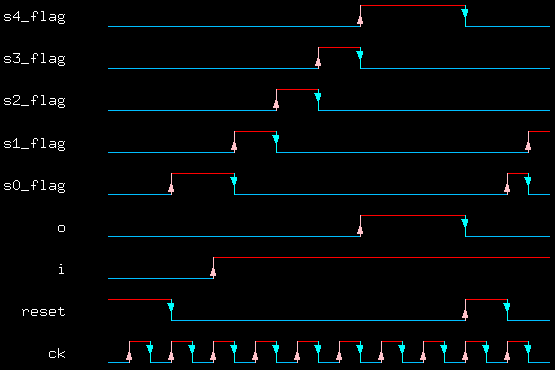
Figure 3. Test pattern to apply to the Four Consecutive One's Counter.
Apply the pattern file to the synthesized description:
|
|
asimut -b dcounterm dcounter r1
-b - chooses the behavioral simulation option dcounterm - dcounterm.vbe dcounter - dcounter.pat r1 - result of simulation in r1.pat |
The following screen is typically displayed:
|
|
[user@eelabX Count4Ones]# asimut -b dcounterm dcounter r1

             @        @@@@ @     @                            @@@@@@@@@@
             @       @    @@    @@@                           @   @@   @
            @@@     @@     @     @                           @    @@    @
            @@@     @@@              @@@ @@ @@@   @@@  @@@@       @@
           @  @@     @@@@     @@@@    @@@ @@  @@   @@    @@       @@
           @  @@       @@@@     @@    @@  @@  @@   @@    @@       @@
          @    @@        @@@    @@    @@  @@  @@   @@    @@       @@
          @@@@@@@   @      @@   @@    @@  @@  @@   @@    @@       @@
         @      @@  @@     @@   @@    @@  @@  @@   @@    @@       @@
         @      @@  @@@    @    @@    @@  @@  @@   @@   @@@       @@
       @@@@    @@@@ @  @@@@   @@@@@@ @@@@ @@@ @@@   @@@@  @@    @@@@@@

                                A SIMUlation Tool

                  Alliance CAD System 3.2b,        asimut v2.01
                  Copyright (c) 1991-1998,       ASIM/LIP6/UPMC
                  E-mail support: alliance-support@asim.lip6.fr

        Paris, France, Europe, Earth, Solar system, Milky Way, ...
Initializing ...
Searching `dcounterm` ...
BEH : Compiling `dcounterm.vbe` (Behaviour) ...
Making GEX ...

Searching pattern file : `dcounter` ...
Restoring ...

Linking ...
###----- processing pattern 0 -----###
###----- processing pattern 1 -----###
###----- processing pattern 2 -----###
###----- processing pattern 3 -----###
###----- processing pattern 4 -----###
###----- processing pattern 5 -----###
###----- processing pattern 6 -----###
###----- processing pattern 7 -----###
###----- processing pattern 8 -----###
###----- processing pattern 9 -----###
###----- processing pattern 10 -----###
###----- processing pattern 11 -----###
###----- processing pattern 12 -----###
###----- processing pattern 13 -----###
###----- processing pattern 14 -----###
###----- processing pattern 15 -----###
###----- processing pattern 16 -----###
###----- processing pattern 17 -----###
###----- processing pattern 18 -----###
###----- processing pattern 19 -----###
###----- processing pattern 20 -----###
[user@eelabX Count4Ones]#
|
You can see the simulation result in the file r1.pat. To see this file use xpat:
|
|
xpat &
|
dcounter.fsm file to debug the state machine can be removed.
We start by copying the dcounter.fsm file to counter.fsm
and editing this file to remove the state flag signals from the description.
|
|
cp dcounter.fsm counter.fsm
|
Edit the file counter.fsm to remove the state flag signals to produce a
description as shown below.
|
|
--***************************************************************************

ENTITY counter IS
  PORT ( ck, i, reset: IN BIT;
         o: OUT BIT;
         vdd, vss: IN BIT
  );
END counter;

--***************************************************************************
-- FSM description

ARCHITECTURE automate OF counter IS

TYPE STATE_TYPE IS ( S0, S1, S2, S3, S4 );

-- pragma CLOCK ck
-- pragma CUR_STATE CURRENT_STATE
-- pragma NEX_STATE NEXT_STATE

SIGNAL CURRENT_STATE, NEXT_STATE: STATE_TYPE;

BEGIN
  PROCESS ( CURRENT_STATE, i, reset )
  BEGIN
    IF ( reset = '1' ) THEN
      NEXT_STATE <= S0;
      o <= '0';
    ELSE
    CASE CURRENT_STATE IS

      WHEN S0 =>
        IF ( i = '1' ) THEN
          NEXT_STATE <= S1;
        ELSE
          NEXT_STATE <= S0;
        END IF;
        o <= '0';

      WHEN S1 =>
        IF ( i = '1' ) THEN
          NEXT_STATE <= S2;
        ELSE
          NEXT_STATE <= S0;
        END IF;
        o <= '0';

      WHEN S2 =>
        IF ( i = '1' ) THEN
          NEXT_STATE <= S3;
        ELSE
          NEXT_STATE <= S0;
        END IF;
        o <= '0';

      WHEN S3 =>
        IF ( i = '1' ) THEN
          NEXT_STATE <= S4;
        ELSE
          NEXT_STATE <= S0;
        END IF;
        o <= '0';

      WHEN S4 =>
        IF ( i = '1' ) THEN
          NEXT_STATE <= S4;
        ELSE
          NEXT_STATE <= S0;
        END IF;
        o <= '1';

      WHEN OTHERS =>
        ASSERT ( '1' )
        REPORT "Illegal State";

    END CASE;
  END IF;
  END PROCESS;

  PROCESS ( ck )
  BEGIN
    IF ( ck = '0' AND NOT ck'STABLE ) THEN
      CURRENT_STATE <= NEXT_STATE;
    END IF;
  END PROCESS;

END automate;
|
Give the command to synthesise the counter.fsm file.
|
|
syf -m -C -V -E counter
-m - Uses "Mustang" as encoding algorithm
-C - Checks the transition's consistency.
-V - Verbose mode on.
-E - Saves the encoding result in the
|
This produces a counterm.vbe file as output.
The following is typically displayed.
|
|
[user@eelabX Count4Ones]# syf -m -C -V -E counter

                          @@@@ @  @@@@   @@@@ @@@@@@@@@
                         @    @@   @@     @     @@    @
                        @@     @    @@   @      @@     @
                        @@@          @@ @       @@
                         @@@@         @@        @@   @
                           @@@@       @@        @@@@@@
                             @@@      @@        @@   @
                        @      @@     @@        @@
                        @@     @@     @@        @@
                        @@@    @      @@        @@
                        @  @@@@     @@@@@@    @@@@@@

                                 FSM Synthesizer

                  Alliance CAD System 3.2b,            syf 3.05
                  Copyright (c) 1995-1998,       ASIM/LIP6/UPMC
                  E-mail support: alliance-support@asim.lip6.fr

                --> Compile FSM file counter
                --> Simplify FSM figure
                --> Verify FSM figure

                --> States  : 5
                --> Inputs  : 2
                --> Outputs : 1
                --> Edges   : 11
                --> Stacks  : 0

                --> Encode FSM figure
                --> Mustang encoding
                --> Save FSM codes
                --> Translate FSM to BEH
                --> Simplify BEH figure

                --> Literals : 57

                --> Save BEH file counterm

[user@eelabX Count4Ones]#
|
NOTE: At this point you should resimulate the synthesized description just to ensure that there were no editing errors:
Copy the file called dcounter.pat to counter.pat.
Modify the pattern file by editing it so that it looks like the following.
|
|
-- input / output list: in vdd B; in vss B;;; in ck B;; in reset B;; in i B;;;; out o B;; begin -- Pattern description: -- vv c r i o -- ds k e -- ds s -- e -- t -- -- pat_0 : 10 0 1 0 ?0 ; pat_1 : 10 1 1 0 ?0 ; pat_2 : 10 0 1 0 ?0 ; pat_3 : 10 1 0 0 ?0 ; pat_4 : 10 0 0 0 ?0 ; pat_5 : 10 1 0 1 ?0 ; pat_6 : 10 0 0 1 ?0 ; pat_7 : 10 1 0 1 ?0 ; pat_8 : 10 0 0 1 ?0 ; pat_9 : 10 1 0 1 ?0 ; pat_10 : 10 0 0 1 ?0 ; pat_10 : 10 1 0 1 ?0 ; pat_11 : 10 0 0 1 ?1 ; pat_12 : 10 1 0 1 ?1 ; pat_13 : 10 0 0 1 ?1 ; pat_14 : 10 1 0 1 ?1 ; pat_15 : 10 0 0 1 ?1 ; pat_16 : 10 1 1 1 ?0 ; pat_17 : 10 0 1 1 ?0 ; pat_18 : 10 1 0 1 ?0 ; pat_19 : 10 0 0 1 ?0 ; end; |
Then
|
|
asimut -b counterm counter r2
-b - chooses the behavioral simulation option counterm - counterm.vbe counter - counter.pat r2 - result of simulation in r2.pat |
For the sake of brevity, in this document this step is not shown (there should be no errors however).
Give the command:
|
|
scmap counterm counterl
|
The following is typically displayed:
|
|
[user@eelabX Count4Ones]# scmap counterm counterl

                @@@@ @      @@@@ @
               @    @@    @@    @@
              @@     @   @@      @
              @@@       @@       @ @@@ @@ @@@     @@@@    @@@ @@@
               @@@@     @@          @@@ @@  @@   @@   @    @@@  @@
                 @@@@   @@          @@  @@  @@   @@   @@   @@    @@
                   @@@  @@          @@  @@  @@     @@@@@   @@    @@
              @      @@ @@          @@  @@  @@   @@   @@   @@    @@
              @@     @@  @@      @  @@  @@  @@  @@    @@   @@    @@
              @@@    @    @@    @@  @@  @@  @@  @@   @@@   @@@  @@
              @  @@@@       @@@@   @@@@ @@@ @@@  @@@@  @@  @@ @@@
                                                           @@
                                                          @@@@

                             Mapping Standard Cells

                Alliance CAD System 3.2b, scmap 4.20 [1997/10/09]
                Copyright (c) 1990-1998,           ASIM/LIP6/UPMC
                E-mail support:     alliance-support@asim.lip6.fr

================================  Environment  ================================
MBK_WORK_LIB        = .
MBK_CATA_LIB        = .:/usr/local/alliance/archi/Linux_elf/cells/sclib:/usr/lo
cal/alliance/archi/Linux_elf/cells/padlib
MBK_TARGET_LIB      = /usr/local/alliance/archi/Linux_elf/cells/sclib
MBK_IN_LO           = vst
MBK_OUT_LO          = vst
=======================  Files, Options and Parameters  =======================
VHDL file           = counterm.vbe
output file         = counterl.vst
Parameter file      = default.lax
Mode                = Mapping standard cell
Optimization mode   = 50% area - 50% delay optimization
Optimization level  = 2
===============================================================================

Compiling 'counter' ...
Running Standard Cell Mapping
=============================  INITIAL COST  ==================================
Total number of literals    = 30
Number of reduced literals  = 54
Number of latches           = 6
Maximum logical depth       = 5
Maximum delay               = 2.000
===============================================================================
Compiling library '/usr/local/alliance/archi/Linux_elf/cells/sclib'
Generating Expert System ...
Cell 'cmx2_y' Unused
Cell 'cry_y' Unused
Cell 'sum_y' Unused
Cell 'tie_y' Unused
162 rules generated
......

==============================  FINAL COST  ===================================
Number of cells used  = 9
Number of gates used  = 18
Number of inverters   = 4
Number of grids       = 23436
Depth max. (gates)          = 5
           (eq. neg. gates) = 7
===============================================================================

MBK Driving './counterl.vst'...
|
The structural file can be examined by giving the Unix "more" command:
|
|
more counterl.vst
|
to see the structural description generated by scmap. The corresponding schematic is shown in Figure 4 below.
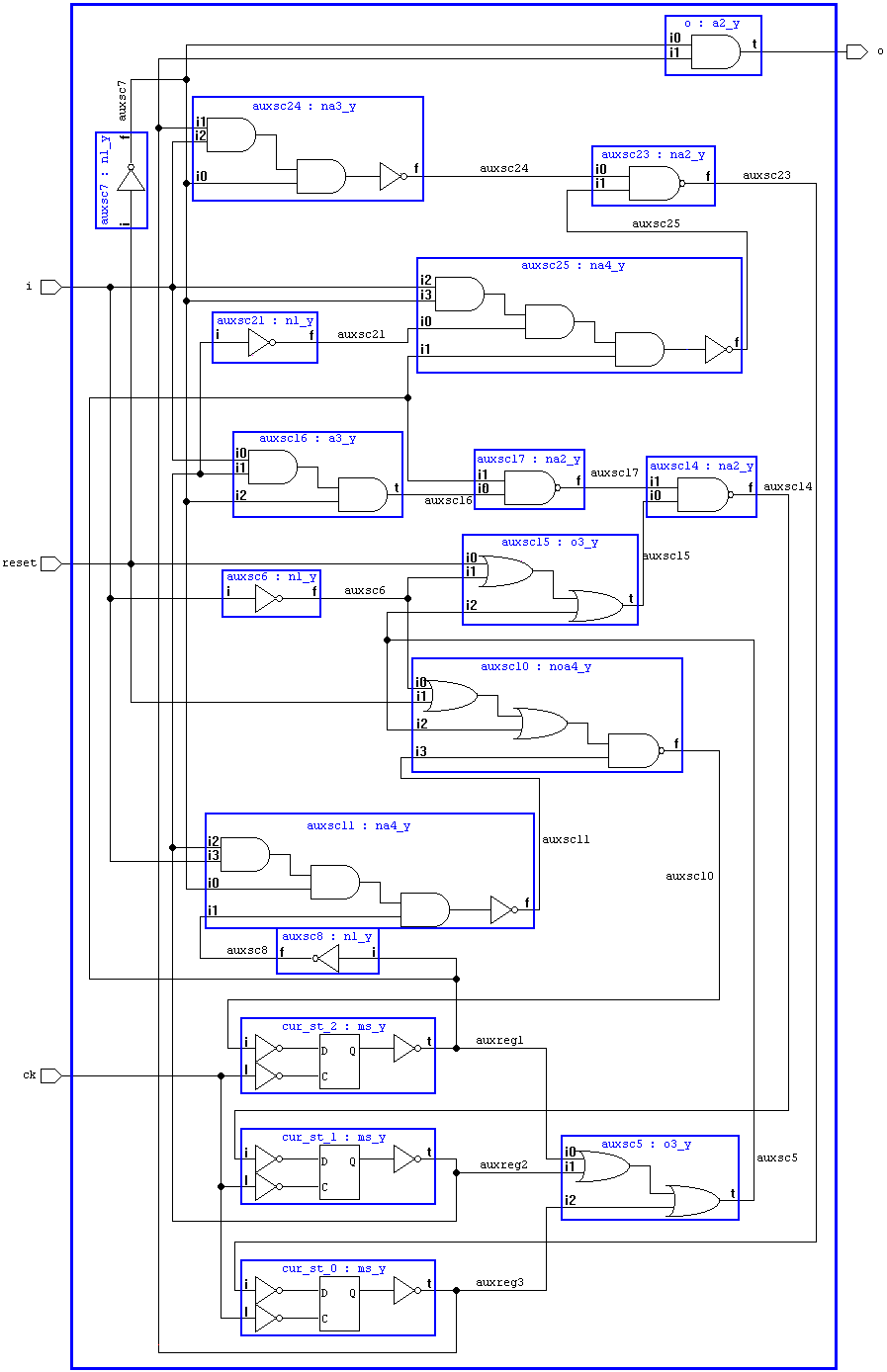
Figure 4. Synthesized 4 ones counter.
Apply the pattern file to the synthesized description. This is done just to ensure that there are no synthesis errors:
|
|
asimut counterl counter r3
counterl - |
|
|
[user@eelabX Count4Ones]# asimut counterl counter r3

             @        @@@@ @     @                            @@@@@@@@@@
             @       @    @@    @@@                           @   @@   @
            @@@     @@     @     @                           @    @@    @
            @@@     @@@              @@@ @@ @@@   @@@  @@@@       @@
           @  @@     @@@@     @@@@    @@@ @@  @@   @@    @@       @@
           @  @@       @@@@     @@    @@  @@  @@   @@    @@       @@
          @    @@        @@@    @@    @@  @@  @@   @@    @@       @@
          @@@@@@@   @      @@   @@    @@  @@  @@   @@    @@       @@
         @      @@  @@     @@   @@    @@  @@  @@   @@    @@       @@
         @      @@  @@@    @    @@    @@  @@  @@   @@   @@@       @@
       @@@@    @@@@ @  @@@@   @@@@@@ @@@@ @@@ @@@   @@@@  @@    @@@@@@

                                A SIMUlation Tool

                  Alliance CAD System 3.2b,        asimut v2.01
                  Copyright (c) 1991-1998,       ASIM/LIP6/UPMC
                  E-mail support: alliance-support@asim.lip6.fr

        Paris, France, Europe, Earth, Solar system, Milky Way, ...
Initializing ...
Searching `counterl` ...
BEH : Compiling `counterl.vst` (Structural) ...
Making GEX ...

Searching pattern file : `counter` ...
Restoring ...

Linking ...
###----- processing pattern 0 -----###
###----- processing pattern 1 -----###
###----- processing pattern 2 -----###
###----- processing pattern 3 -----###
###----- processing pattern 4 -----###
###----- processing pattern 5 -----###
###----- processing pattern 6 -----###
###----- processing pattern 7 -----###
###----- processing pattern 8 -----###
###----- processing pattern 9 -----###
###----- processing pattern 10 -----###
###----- processing pattern 11 -----###
###----- processing pattern 12 -----###
###----- processing pattern 13 -----###
###----- processing pattern 14 -----###
###----- processing pattern 15 -----###
###----- processing pattern 16 -----###
###----- processing pattern 17 -----###
###----- processing pattern 18 -----###
###----- processing pattern 19 -----###
###----- processing pattern 20 -----###
[user@eelabX Count4Ones]#
|
|
|
scr -p -r -l 3 counterl
-p - invokes the automatic placement process -r - invokes the automatic routing process -l - specifies the number of rows to use |
The following is typically displayed:
|
|
[user@eelabX Count4Ones]# scr -p -r -l 3 counterl

                          @@@@ @      @@@@ @ @@@@@@@
                         @    @@    @@    @@   @@   @@
                        @@     @   @@      @   @@    @@
                        @@@       @@       @   @@    @@
                         @@@@     @@           @@   @@
                           @@@@   @@           @@@@@
                             @@@  @@           @@  @@
                        @      @@ @@           @@   @@
                        @@     @@  @@      @   @@   @@
                        @@@    @    @@    @@   @@    @@
                        @  @@@@       @@@@   @@@@@   @@@

                              Standard Cell router

                  Alliance CAD System 3.2b,             scr 5.2
                  Copyright (c) 1991-1998,       ASIM/LIP6/UPMC
                  E-mail support: alliance-support@asim.lip6.fr

Loading logical view : counterl
Placing logical view : counterl
Loading SCP data base ...
Generating initial placement ...
18 cells 23 nets in 3 rows
Placement in process of treatment : 100%
43% saved in  0.2 s
Saving placement 100%
Checking consistency between logical and physical views
Loading SCR data base ...
Deleting MBK data base ...
Global routing ...
Channel routing ...
|_____Routing Channel : scr_p2
|_____Routing Channel : scr_p4
|_____Routing Channel : scr_p6
|_____Routing Channel : scr_p8
Making vertical power and ground wires
Saving layout : counterl
[user@eelabX Count4Ones]#
|
A counterl.ap file is created which can be viewed with graal.
|
|
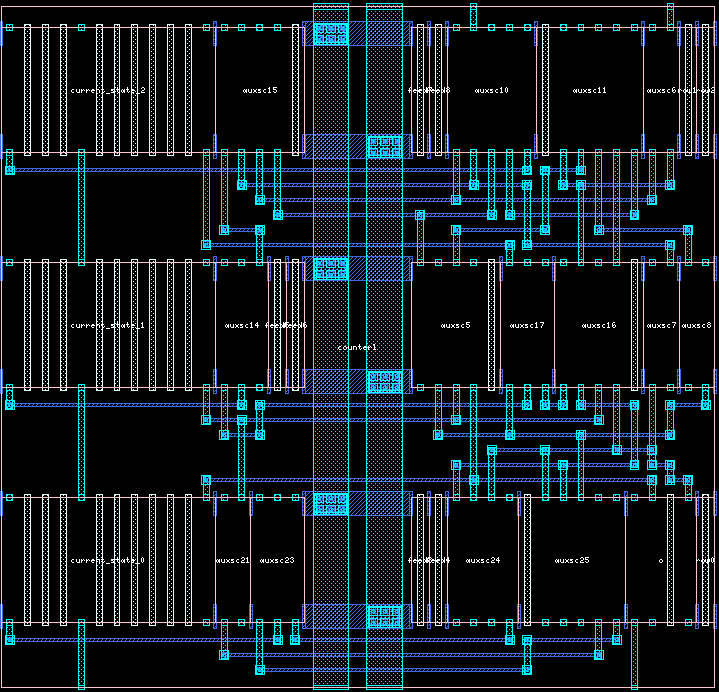
Figure 5. Layout of the 4 ones counter.
|
|
|
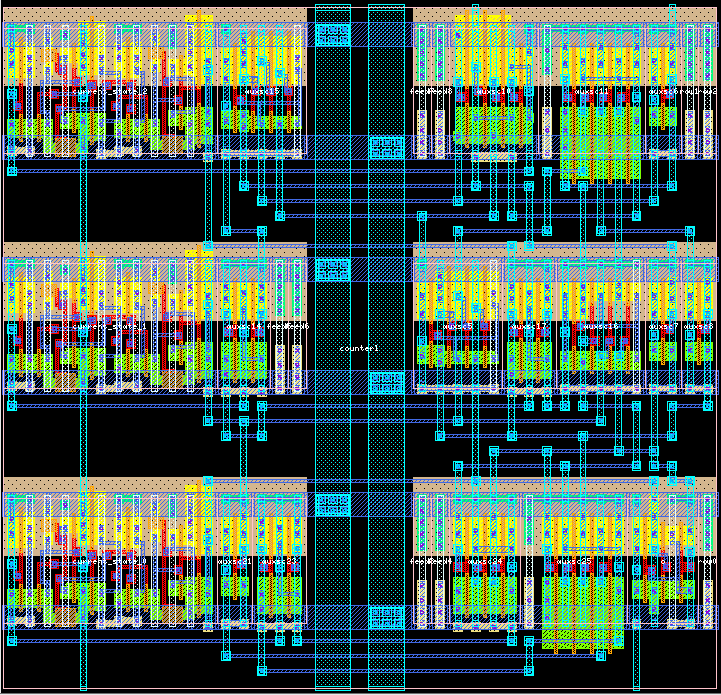
Figure 6. Flattened layout of the 4 ones counter.
|
counterl.ap layout to the technology's
design rules:
|
|
druc counterl
|
The following is typically displayed.
|
|
[user@eelabX Count4Ones]# druc counterl

                  @@@@@@@     @@@@@@@                    @@@@ @
                    @@   @@     @@   @@                @@    @@
                    @@    @@    @@    @@              @@      @
                    @@     @@   @@    @@  @@@  @@@@  @@       @
                    @@     @@   @@   @@    @@    @@  @@
                    @@     @@   @@@@@      @@    @@  @@
                    @@     @@   @@  @@     @@    @@  @@
                    @@     @@   @@   @@    @@    @@  @@
                    @@    @@    @@   @@    @@    @@   @@      @
                    @@   @@     @@    @@   @@   @@@    @@    @@
                  @@@@@@@     @@@@@   @@@   @@@@  @@     @@@@

                               Design Rule Checker

                  Alliance CAD System 3.2b,           druc 3.00
                  Copyright (c) 1993-1998,       ASIM/LIP6/UPMC
                  E-mail support: alliance-support@asim.lip6.fr

Flatten DRC on: counterl
Delete MBK figure : counterl
Load Flatten Rules : /usr/local/alliance/archi/Linux_elf/etc/cmos_7.rds

Unify : counterl

Create Ring : counterl_rng
Merge Errorfiles:

Merge Error Instances:
instructionCourante :  50
End DRC on: counterl
Saving the Error file figure
Done
  0

File: counterl.drc is empty: no errors detected.

[user@eelabX Count4Ones]#
|

|
setenv RDS_TECHNO_NAME $TOP/etc/prol10_7.rds
|
This chooses the 1.0  m generic CMOS process whose
technology file is the
m generic CMOS process whose
technology file is the prol10.rds.
Give the command:
|
|
s2r -v counterl counterl
-v - verbose mode on first counterl - counterl.ap as input second counterl - counterl.cif as output |
The following is typically displayed:
|
|
[user@eelabX Count4Ones]# s2r -v counterl counterl

                                      @@@@
                                     @   @@
                                    @@    @@
                            @@@@@@  @@@   @@ @@@ @@@
                           @@    @   @   @@   @@@  @@
                           @@@           @    @@   @@
                            @@@@        @     @@
                              @@@@     @      @@
                           @    @@@   @    @  @@
                           @@    @@  @@@@@@   @@
                           @ @@@@@  @@@@@@@  @@@@

                        Symbolic to Real layout converter

                  Alliance CAD System 3.2b,             s2r 3.6
                  Copyright (c) 1991-1998,       ASIM/LIP6/UPMC
                  E-mail support: alliance-support@asim.lip6.fr


	o loading technology file : /usr/local/alliance/archi/Linux_elf/etc/prol10_7.r
        ds
	o loading all level of symbolic layout : counterl
	o removing symbolic data structure
	o layout post-treating without connector, with scotchs.
	--> post-treating model ms_y
	    rectangle merging :
	    . RDS_NWELL .................................
	    . RDS_NIMP .................................
	    . RDS_PIMP .................................
	    . RDS_ACTIV .................................
	    . RDS_POLY .................................
	    . RDS_ALU1 .................................
	    . RDS_ALU2 .................................
	--> post-treating model n1_y
	    rectangle merging :
	    . RDS_NWELL .................................
	    . RDS_NIMP .................................
	    . RDS_PIMP .................................
	    . RDS_ACTIV .................................
	    . RDS_POLY .................................
	    . RDS_ALU1 .................................
	    . RDS_ALU2 .................................
	--> post-treating model na2_y
	    rectangle merging :
	    . RDS_NWELL .................................
	    . RDS_NIMP .................................
	    . RDS_PIMP .................................
	    . RDS_ACTIV .................................
	    . RDS_POLY .................................
	    . RDS_ALU1 .................................
	    . RDS_ALU2 .................................
	--> post-treating model tie_y
	    rectangle merging :
	    . RDS_NWELL .................................
	    . RDS_NIMP .................................
	    . RDS_PIMP .................................
	    . RDS_ACTIV .................................
	    . RDS_ALU1 .................................
	--> post-treating model na3_y
	    rectangle merging :
	    . RDS_NWELL .................................
	    . RDS_NIMP .................................
	    . RDS_PIMP .................................
	    . RDS_ACTIV .................................
	    . RDS_POLY .................................
	    . RDS_ALU1 .................................
	    . RDS_ALU2 .................................
	--> post-treating model na4_y
	    rectangle merging :
	    . RDS_NWELL .................................
	    . RDS_NIMP .................................
	    . RDS_PIMP .................................
	    . RDS_ACTIV .................................
	    . RDS_POLY .................................
	    . RDS_ALU1 .................................
	    . RDS_ALU2 .................................
	--> post-treating model a2_y
	    rectangle merging :
	    . RDS_NWELL .................................
	    . RDS_NIMP .................................
	    . RDS_PIMP .................................
	    . RDS_ACTIV .................................
	    . RDS_POLY .................................
	    . RDS_ALU1 .................................
	    . RDS_ALU2 .................................
	--> post-treating model o3_y
	    rectangle merging :
	    . RDS_NWELL .................................
	    . RDS_NIMP .................................
	    . RDS_PIMP .................................
	    . RDS_ACTIV .................................
	    . RDS_POLY .................................
	    . RDS_ALU1 .................................
	    . RDS_ALU2 .................................
	--> post-treating model a3_y
	    rectangle merging :
	    . RDS_NWELL .................................
	    . RDS_NIMP .................................
	    . RDS_PIMP .................................
	    . RDS_ACTIV .................................
	    . RDS_POLY .................................
	    . RDS_ALU1 .................................
	    . RDS_ALU2 .................................
	--> post-treating model noa4_y
	    rectangle merging :
	    . RDS_NWELL .................................
	    . RDS_NIMP .................................
	    . RDS_PIMP .................................
	    . RDS_ACTIV .................................
	    . RDS_POLY .................................
	    . RDS_ALU1 .................................
	    . RDS_ALU2 .................................
	--> post-treating model counterl
	    ring flattenning  :
	    . RDS_NWELL .................................
	    . RDS_NIMP .................................
	    . RDS_PIMP .................................
	    . RDS_ACTIV .................................
	    . RDS_POLY .................................
	    . RDS_ALU1 .................................
	    . RDS_ALU2 .................................
	    rectangle merging :
	    . RDS_NWELL .................................
	    . RDS_NIMP .................................
	    . RDS_PIMP .................................
	    . RDS_ACTIV .................................
	    . RDS_POLY .................................
	    . RDS_ALU1 .................................
	    . RDS_ALU2 .................................
	o saving counterl.cif
	o memory allocation informations
	--> required rectangles = 2515  really allocated = 943
	--> required scotchs = 3  really created = 3
	--> Number of allocated bytes: 67289
[user@eelabX Count4Ones]#
|
A counterl.cif file is created which can be viewed with dreal.
|
|
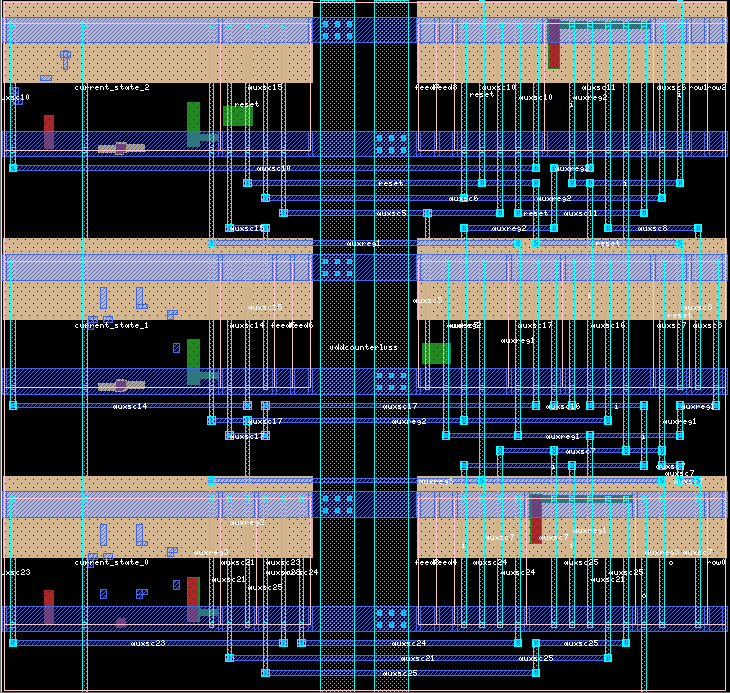
Figure 7. Real Layout of the 4 ones counter.
|
|
|
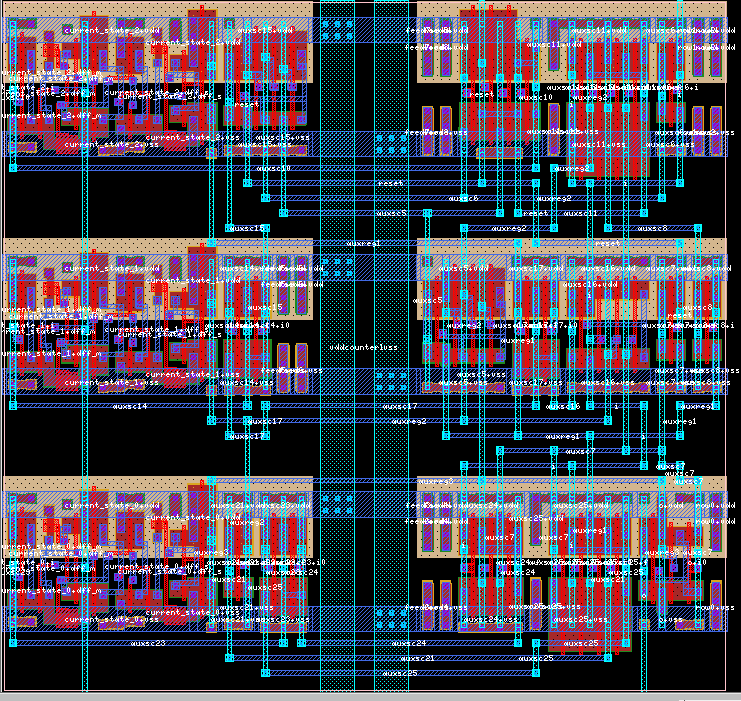
Figure 8. Real flattened layout of the 4 ones counter.
|
This completes the design of the counter core.