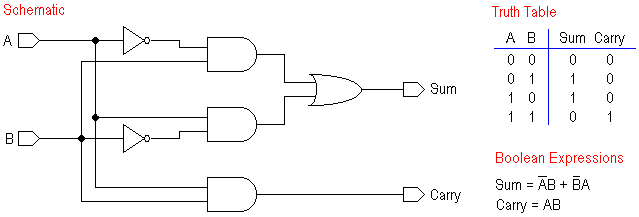
Figure 1. 1-bit half adder.
The design example consists of two phases. The first phase will describe and synthesize the behavior of the half adder. In the second phase the half adder will be used to describe the structure of a full adder (the core of the chip), and then synthesize it.
Figure 1. 1-bit half adder.
In this phase you will:
halfadder.vbe).
halfadder.pat).
halfadderl.vst).
halfadderl.ap).
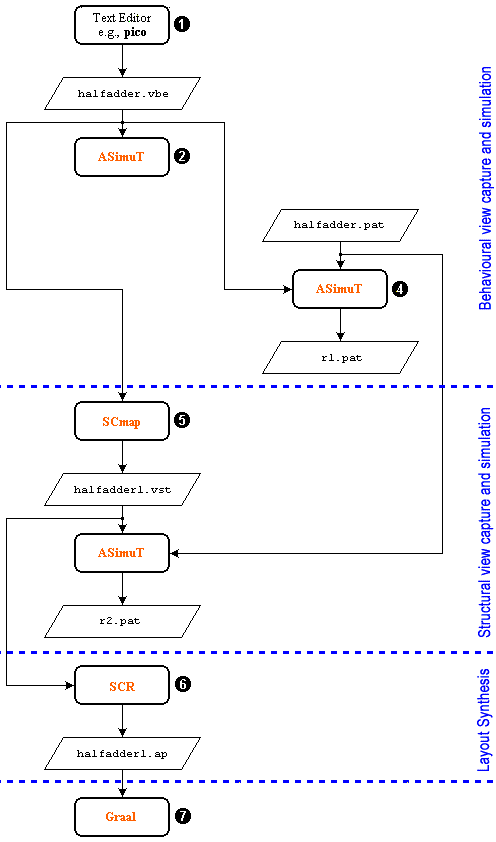
Figure 2. Design Flow for the Half Adder component.

|
mkdir FullAdder
|
Change into this directory:
|
|
cd FullAdder
|

|
|
|
The behavioral description is done using the
Alliance VHDL behavioral subset.
Only concurrent statements are supported. No sequential statements are allowed.
More details are available in the man pages (man vbe). We begin our
design by describing the behavior of the signals in the half adder.
Create with an editor a file called
|

|
--************************************************************

ENTITY halfadder IS
  PORT ( A, B, Vdd, Vss: IN BIT;
         Sum, Carry: OUT BIT );
END halfadder;

--***********************************************************

ARCHITECTURE halfadder_data_flow OF halfadder IS

  SIGNAL A_bar, B_bar: BIT;

BEGIN

  A_bar <= NOT A;
  B_bar <= NOT B;

  Sum <= ( A_bar AND B ) OR ( A AND B_bar );

  Carry <= A AND B;

END halfadder_data_flow;
|
|
|
asimut is a logical simulation tool for hardware descriptions.
It compiles and loads a VHDL description, which may be behavioral
or structural. Only the VHDL subset discussed above is supported.
Information on asimut's command line parameters, options,
environmental variables required are available in the man pages
(man asimut).
Any typographical or syntax error in a behavioral description can be found when the file is passed through asimut. |
Give the following command at the command line:
|
|
asimut -b -c halfadder
-b - behavioral option -c - compile |
The following is typically displayed.

|
[user@eelabX FullAdder]% asimut -b -c halfadder

             @        @@@@ @     @                            @@@@@@@@@@
             @       @    @@    @@@                           @   @@   @
            @@@     @@     @     @                           @    @@    @
            @@@     @@@              @@@ @@ @@@   @@@  @@@@       @@
           @  @@     @@@@     @@@@    @@@ @@  @@   @@    @@       @@
           @  @@       @@@@     @@    @@  @@  @@   @@    @@       @@
          @    @@        @@@    @@    @@  @@  @@   @@    @@       @@
          @@@@@@@   @      @@   @@    @@  @@  @@   @@    @@       @@
         @      @@  @@     @@   @@    @@  @@  @@   @@    @@       @@
         @      @@  @@@    @    @@    @@  @@  @@   @@   @@@       @@
       @@@@    @@@@ @  @@@@   @@@@@@ @@@@ @@@ @@@   @@@@  @@    @@@@@@

                                A SIMUlation Tool

                  Alliance CAD System 3.2b,        asimut v2.01
                  Copyright (c) 1991-1998,       ASIM/LIP6/UPMC
                  E-mail support: alliance-support@asim.lip6.fr

        Paris, France, Europe, Earth, Solar system, Milky Way, ...
Initializing ...
Searching `halfadder` ...
BEH : Compiling `halfadder.vbe` (Behaviour) ...
Making GEX ...
|
|
|
If the above step functions without giving syntax errors then the behavioral
description is ready for simulation.
A file with the test patterns in the pat format is required for the simulation. The pat format file has a declaration part and a description part of the signals. The declaration part consists of a list of inputs, outputs, internal signals and registers of the design. Inputs are forced to a particular value while the outputs are observed during a simulation. The easiest way to create a pattern file is to write it on your own. Do this by using the JOE editor or the editor in MC. |
Create a file called halfadder.pat and enter the following as
is:
|
|
-- input / output list : in vdd B; in vss B;;;;;; in a B;;; in b B;;; out sum B;;; out carry B;;; begin -- Pattern description : -- vv a b s c -- ds u a -- ds m r -- r -- y pat_0 : 10 0 0 ?* ?* ; pat_1 : 10 0 1 ?* ?* ; pat_2 : 10 1 0 ?* ?* ; pat_3 : 10 1 1 ?* ?* ; end; |
Examine the generated pattern file using the more command.
|
|
more halfadder.pat
|
or give the following command to see a graphical waveform:
|
|
xpat
|
|
|
A new window is opened. Choose the File menu from the menu bar and choose
the open option from the menu that pops up. Another sub window inside the
main window will be opened. In this window the files with the extension
.pat will be listed. Choose the halfadder.pat file and
press the ok button. The corresponding waveform will appear on the screen.
|
Should you want, edit the halfadder.pat file using the text editor
and change the 0s to 1s or viceversa to modify the test
patterns.
|
|
asimut -b halfadder halfadder r1
-b - chooses the behavioral simulation option first halfadder - |
The following screen is typically displayed:
|
|
[orion]% asimut -b halfadder halfadder r1

             @        @@@@ @     @                            @@@@@@@@@@
             @       @    @@    @@@                           @   @@   @
            @@@     @@     @     @                           @    @@    @
            @@@     @@@              @@@ @@ @@@   @@@  @@@@       @@
           @  @@     @@@@     @@@@    @@@ @@  @@   @@    @@       @@
           @  @@       @@@@     @@    @@  @@  @@   @@    @@       @@
          @    @@        @@@    @@    @@  @@  @@   @@    @@       @@
          @@@@@@@   @      @@   @@    @@  @@  @@   @@    @@       @@
         @      @@  @@     @@   @@    @@  @@  @@   @@    @@       @@
         @      @@  @@@    @    @@    @@  @@  @@   @@   @@@       @@
       @@@@    @@@@ @  @@@@   @@@@@@ @@@@ @@@ @@@   @@@@  @@    @@@@@@

                                A SIMUlation Tool

                  Alliance CAD System 3.2b,        asimut v2.01
                  Copyright (c) 1991-1998,       ASIM/LIP6/UPMC
                  E-mail support: alliance-support@asim.lip6.fr

        Paris, France, Europe, Earth, Solar system, Milky Way, ...
Initializing ...
Searching `halfadder` ...
BEH : Compiling `halfadder.vbe` (Behaviour) ...
Making GEX ...

Searching pattern file : `halfadder` ...
Restoring ...

Linking ...
###----- processing pattern 0 -----###
###----- processing pattern 1 -----###
###----- processing pattern 2 -----###
###----- processing pattern 3 -----###
[orion]%
|
You can see the simulation result in the file r1.pat. To see this
file use xpat:
|
|
xpat &
|
|
|
The description given in the halfadder.vbe file is synthesized to
the logical and structural descriptions using scmap. Since the circuit
is very simple, we will map it to the standard cell library directly without
doing any optimizations. Detailed information on scmap is available in
the man pages (man scmap).
|
|
|
scmap halfadder halfadderl
|
The following is typically displayed:
|
|
[orion]% scmap halfadder halfadderl

                @@@@ @      @@@@ @
               @    @@    @@    @@
              @@     @   @@      @
              @@@       @@       @ @@@ @@ @@@     @@@@    @@@ @@@
               @@@@     @@          @@@ @@  @@   @@   @    @@@  @@
                 @@@@   @@          @@  @@  @@   @@   @@   @@    @@
                   @@@  @@          @@  @@  @@     @@@@@   @@    @@
              @      @@ @@          @@  @@  @@   @@   @@   @@    @@
              @@     @@  @@      @  @@  @@  @@  @@    @@   @@    @@
              @@@    @    @@    @@  @@  @@  @@  @@   @@@   @@@  @@
              @  @@@@       @@@@   @@@@ @@@ @@@  @@@@  @@  @@ @@@
                                                           @@
                                                          @@@@

                             Mapping Standard Cells

                Alliance CAD System 3.2b, scmap 4.20 [1997/10/09]
                Copyright (c) 1990-1998,           ASIM/LIP6/UPMC
                E-mail support:     alliance-support@asim.lip6.fr

================================  Environment  ================================
MBK_WORK_LIB        = .
MBK_CATA_LIB        = .:/usr/local/alliance/archi/Linux_elf/cells/sclib:/usr/lo
cal/alliance/archi/Linux_elf/cells/padlib
MBK_TARGET_LIB      = /usr/local/alliance/archi/Linux_elf/cells/sclib
MBK_IN_LO           = vst
MBK_OUT_LO          = vst
=======================  Files, Options and Parameters  =======================
VHDL file           = halfadder.vbe
output file         = halfadderl.vst
Parameter file      = default.lax
Mode                = Mapping standard cell
Optimization mode   = 50% area - 50% delay optimization
Optimization level  = 2
===============================================================================

Compiling 'halfadder' ...
Running Standard Cell Mapping
=============================  INITIAL COST  ==================================
Total number of literals    = 6
Number of reduced literals  = 8
Number of latches           = 0
Maximum logical depth       = 2
Maximum delay               = 1.000
===============================================================================
Compiling library '/usr/local/alliance/archi/Linux_elf/cells/sclib'
Generating Expert System ...
Cell 'cmx2_y' Unused
Cell 'cry_y' Unused
Cell 'sum_y' Unused
Cell 'tie_y' Unused
162 rules generated
..

==============================  FINAL COST  ===================================
Number of cells used  = 3
Number of gates used  = 4
Number of inverters   = 2
Number of grids       = 3276
Depth max. (gates)          = 2
           (eq. neg. gates) = 2
===============================================================================

MBK Driving './halfadderl.vst'...

[orion]%
|
The structural file can be examined by giving the Unix "more" command:
|
|
more halfadderl.vst
|
to see the structural description generated by scmap. The corresponding schematic is shown in Figure 3 below.
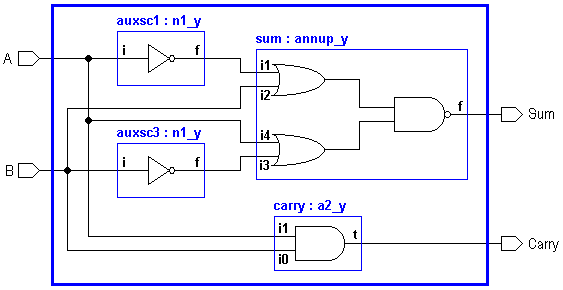
Figure 3. Synthesized 1-bit half adder.
|
|
You can do the simulation of the structural description with the same pattern files that were used for the behavioral description. |
To do the simulation on the structural description, give the following command at the command prompt.
|
|
asimut halfadderl halfadder r2
no option - takes the structural description by default halfadderl - |
The following screen is typically displayed
|
|
[orion]% asimut halfadderl halfadder r2

             @        @@@@ @     @                            @@@@@@@@@@
             @       @    @@    @@@                           @   @@   @
            @@@     @@     @     @                           @    @@    @
            @@@     @@@              @@@ @@ @@@   @@@  @@@@       @@
           @  @@     @@@@     @@@@    @@@ @@  @@   @@    @@       @@
           @  @@       @@@@     @@    @@  @@  @@   @@    @@       @@
          @    @@        @@@    @@    @@  @@  @@   @@    @@       @@
          @@@@@@@   @      @@   @@    @@  @@  @@   @@    @@       @@
         @      @@  @@     @@   @@    @@  @@  @@   @@    @@       @@
         @      @@  @@@    @    @@    @@  @@  @@   @@   @@@       @@
       @@@@    @@@@ @  @@@@   @@@@@@ @@@@ @@@ @@@   @@@@  @@    @@@@@@

                                A SIMUlation Tool

                  Alliance CAD System 3.2b,        asimut v2.01
                  Copyright (c) 1991-1998,       ASIM/LIP6/UPMC
                  E-mail support: alliance-support@asim.lip6.fr

        Paris, France, Europe, Earth, Solar system, Milky Way, ...
Initializing ...
Searching `halfadderl` ...
Compiling `halfadderl` (Structural) ...

Flattening the root figure ...

Searching `a2_y` ...
BEH : Compiling `a2_y.vbe` (Behaviour) ...
Making GEX ...

Searching `annup_y` ...
BEH : Compiling `annup_y.vbe` (Behaviour) ...
Making GEX ...

Searching `n1_y` ...
BEH : Compiling `n1_y.vbe` (Behaviour) ...
Making GEX ...

Searching pattern file : `halfadder` ...
Restoring ...

Linking ...
###----- processing pattern 0 -----###
###----- processing pattern 1 -----###
###----- processing pattern 2 -----###
###----- processing pattern 3 -----###
[orion]%
|
|
|
The structural description created above has been created without worrying
about the standard cells fanout limits and critical path signals. glop
can analyze the structural description and create a new description by adding
buffers to the appropriate nets so as to solve fanout problems and to optimize
on signal delays. However, at this moment we are not concerned about this.
Detailed information on glop is available in the man pages
(man glop).
|
|
|
The Standard Cell Router scr is used to place and route the core of the
halfadderl.vst file. This creates a file with extension
.ap. More information on scr is available in the man pages
(man scr).
|
|
|
scr -p -r -i 1000 halfadderl
-p - invokes the automatic placement process -r - invokes the automatic routing process -i - iteration number to improve the placement quality (here 1000) |
The following is typically displayed.
|
|
[orion]% scr -p -r -i 1000 halfadderl

                          @@@@ @      @@@@ @ @@@@@@@
                         @    @@    @@    @@   @@   @@
                        @@     @   @@      @   @@    @@
                        @@@       @@       @   @@    @@
                         @@@@     @@           @@   @@
                           @@@@   @@           @@@@@
                             @@@  @@           @@  @@
                        @      @@ @@           @@   @@
                        @@     @@  @@      @   @@   @@
                        @@@    @    @@    @@   @@    @@
                        @  @@@@       @@@@   @@@@@   @@@

                              Standard Cell router

                  Alliance CAD System 3.2b,             scr 5.2
                  Copyright (c) 1991-1998,       ASIM/LIP6/UPMC
                  E-mail support: alliance-support@asim.lip6.fr

Loading logical view : halfadderl
Placing logical view : halfadderl
Loading SCP data base ...
Generating initial placement ...
4 cells 8 nets in 1 rows
Placement in process of treatment : 100%
9% saved in  3.0 s
Saving placement 100%
Checking consistency between logical and physical views
Loading SCR data base ...
Deleting MBK data base ...
Global routing ...
Channel routing ...
|_____Routing Channel : scr_p2
|_____Routing Channel : scr_p4
Making vertical power and ground wires
Saving layout : halfadderl
[orion]%
|
halfadderl.ap we use graal,
a symbolic layout editor.
Give the command
|
|
graal
|
|
|
A new window is opened. Choose the File menu from the menu bar and choose
the open option from the menu that pops up. Another sub window inside the
main window will be opened. In this window the files with the extension
.ap will be listed. Choose the halfadderl.ap file and
press the ok button. The layout will appear on the screen, but only at
the standard cell level:
|
|
|

|
| Figure 4. Layout of the half adder. |
|---|
|
|
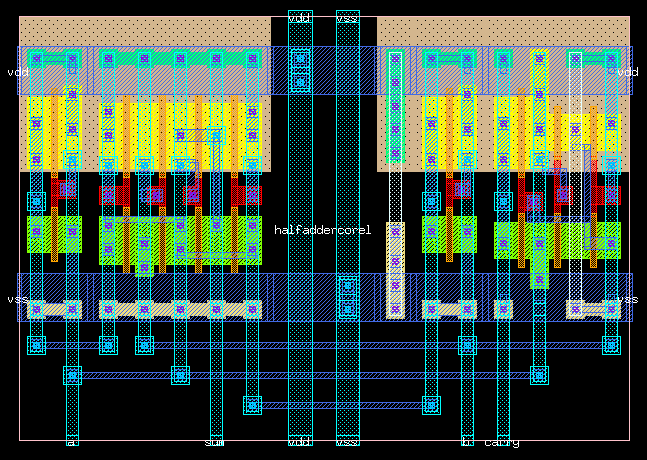
Now you can choose the Tool option from the menu bar and from the pop-up menu choose the peek option. Now with the mouse mark the window where you want to "peek" at the layout. If the whole layout is "peek"ed typically you will see the layout as shown below: |
|
|
|
| Figure 5. Flattened layout of the half adder. |
|---|
This completes the design of the half adder component.

Figure 6. 1-bit full adder.
The behavioral description focuses on block behavior. Figure 7 shows how two instances of the same building block, the half adder, can be used to implement a full adder using an structural approach.
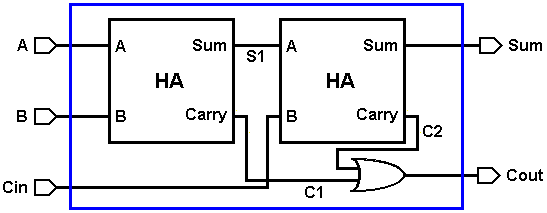
| |
| (a) Block diagram composition of the full adder | |

|
|
| (b) Top level block diagram of the full adder | |
| Figure 7. Internal and external block diagram views of the 1-bit full adder. |
|---|
In this phase you will complete the proposed design:
fulladder.vst) using the previously designed half-adder.
fulladder.pat).
fulladder.ap).
fulladder.ap).
fulladder.cif).
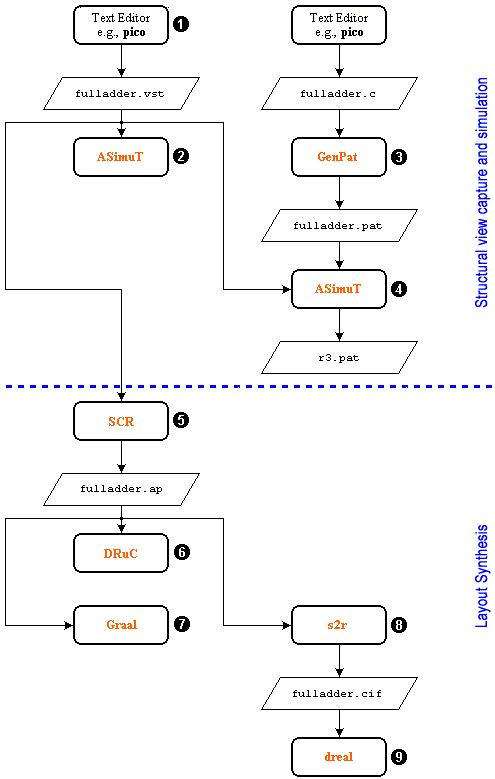
Figure 8. Design Flow for the Full Adder.
|
|
The structural description is done using the
Alliance VHDL structural subset.
Create with the "pico" editor a file called |
|
|
--**********************************************************

ENTITY fulladder IS

PORT ( A, B, Cin, Vdd, Vss: IN BIT;
       Sum, Cout: OUT BIT );
END fulladder;

--*********************************************************

ARCHITECTURE fulladder_structural OF fulladder IS

-- Declare components to use

  COMPONENT halfadderl
    PORT (
      A: IN BIT;
      B: IN BIT;
      Sum: OUT BIT;
      Carry: OUT BIT;
      Vdd: IN BIT;
      Vss: IN BIT
    );
  END COMPONENT;

  COMPONENT o2_y
    PORT (
      i0: IN BIT;
      i1: IN BIT;
      t: OUT BIT;
      vdd: IN BIT;
      vss: IN BIT
    );
  END COMPONENT;

-- Declare internal signals

SIGNAL c1, s1, c2: BIT;

BEGIN

-- Instantiate components and connect them

  ha1: halfadderl
    PORT MAP (
      Vss => Vss,
      Vdd => Vdd,
      A => A,
      B => B,
      Sum => s1,
      Carry => c1
    );

  ha2: halfadderl
    PORT MAP (
      Vss => Vss,
      Vdd => Vdd,
      A => s1,
      B => Cin,
      Sum => Sum,
      Carry => c2
    );

  or1: o2_y
    PORT MAP (
      vss => Vss,
      vdd => Vdd,
      i0 => c1,
      i1 => c2,
      t => Cout
    );

END fulladder_structural;
|
|
|
Any typographical or syntax error in a structural description can be found when the file is passed through asimut. |
Give the following command at the command line:
|
|
asimut -c fulladder
-c - compile |
The following is typically displayed.
|
|
[orion]% asimut -c fulladder

             @        @@@@ @     @                            @@@@@@@@@@
             @       @    @@    @@@                           @   @@   @
            @@@     @@     @     @                           @    @@    @
            @@@     @@@              @@@ @@ @@@   @@@  @@@@       @@
           @  @@     @@@@     @@@@    @@@ @@  @@   @@    @@       @@
           @  @@       @@@@     @@    @@  @@  @@   @@    @@       @@
          @    @@        @@@    @@    @@  @@  @@   @@    @@       @@
          @@@@@@@   @      @@   @@    @@  @@  @@   @@    @@       @@
         @      @@  @@     @@   @@    @@  @@  @@   @@    @@       @@
         @      @@  @@@    @    @@    @@  @@  @@   @@   @@@       @@
       @@@@    @@@@ @  @@@@   @@@@@@ @@@@ @@@ @@@   @@@@  @@    @@@@@@

                                A SIMUlation Tool

                  Alliance CAD System 3.2b,        asimut v2.01
                  Copyright (c) 1991-1998,       ASIM/LIP6/UPMC
                  E-mail support: alliance-support@asim.lip6.fr

        Paris, France, Europe, Earth, Solar system, Milky Way, ...
Initializing ...
Searching `fulladder` ...
Compiling `fulladder` (Structural) ...

Flattening the root figure ...

Searching `a2_y` ...
BEH : Compiling `a2_y.vbe` (Behaviour) ...
Making GEX ...

Searching `annup_y` ...
BEH : Compiling `annup_y.vbe` (Behaviour) ...
Making GEX ...

Searching `n1_y` ...
BEH : Compiling `n1_y.vbe` (Behaviour) ...
Making GEX ...

Searching `o2_y` ...
BEH : Compiling `o2_y.vbe` (Behaviour) ...
Making GEX ...

[orion]%
|
|
|
If the above step functions without giving syntax errors then the structural description is ready for simulation. |
Create a file called fulladder.pat by modyfiying
the existing halfadder.pat.
Give the following command to see a graphical waveform:
|
|
xpat
|
Should you want, edit the fulladder.pat file using the text editor
and change the 0s to 1s or viceversa to modify the
test patterns.
|
|
asimut fulladder fulladder r3
no option - chooses the structural simulation option first halfadder - |
The following screen is typically displayed:
|
|
[orion]% asimut fulladder fulladder r3

             @        @@@@ @     @                            @@@@@@@@@@
             @       @    @@    @@@                           @   @@   @
            @@@     @@     @     @                           @    @@    @
            @@@     @@@              @@@ @@ @@@   @@@  @@@@       @@
           @  @@     @@@@     @@@@    @@@ @@  @@   @@    @@       @@
           @  @@       @@@@     @@    @@  @@  @@   @@    @@       @@
          @    @@        @@@    @@    @@  @@  @@   @@    @@       @@
          @@@@@@@   @      @@   @@    @@  @@  @@   @@    @@       @@
         @      @@  @@     @@   @@    @@  @@  @@   @@    @@       @@
         @      @@  @@@    @    @@    @@  @@  @@   @@   @@@       @@
       @@@@    @@@@ @  @@@@   @@@@@@ @@@@ @@@ @@@   @@@@  @@    @@@@@@

                                A SIMUlation Tool

                  Alliance CAD System 3.2b,        asimut v2.01
                  Copyright (c) 1991-1998,       ASIM/LIP6/UPMC
                  E-mail support: alliance-support@asim.lip6.fr

        Paris, France, Europe, Earth, Solar system, Milky Way, ...
Initializing ...
Searching `fulladder` ...
Compiling `fulladder` (Structural) ...

Flattening the root figure ...

Searching `a2_y` ...
BEH : Compiling `a2_y.vbe` (Behaviour) ...
Making GEX ...

Searching `annup_y` ...
BEH : Compiling `annup_y.vbe` (Behaviour) ...
Making GEX ...

Searching `n1_y` ...
BEH : Compiling `n1_y.vbe` (Behaviour) ...
Making GEX ...

Searching `o2_y` ...
BEH : Compiling `o2_y.vbe` (Behaviour) ...
Making GEX ...

Searching pattern file : `fulladder` ...
Restoring ...

Linking ...
###----- processing pattern 0 -----###
###----- processing pattern 1 -----###
###----- processing pattern 2 -----###
###----- processing pattern 3 -----###
###----- processing pattern 4 -----###
###----- processing pattern 5 -----###
###----- processing pattern 6 -----###
###----- processing pattern 7 -----###
[orion]%
|
You can see the simulation result in the file r3.pat. To see this
file use xpat:
|
|
xpat &
|
fulladder.vst file. This
creates a file with extension .ap. More information on scr
is available in the man pages (man scr).
|
|
scr -p -r -l 2 -i 1000 fulladder
-p - invokes the automatic placement process -r - invokes the automatic routing process -l - specifies the number of rows to use -i - iteration number to improve the placement quality |
The following is typically displayed.
|
|
[orion]% scr -p -r -l 2 -i 1000 fulladder

                          @@@@ @      @@@@ @ @@@@@@@
                         @    @@    @@    @@   @@   @@
                        @@     @   @@      @   @@    @@
                        @@@       @@       @   @@    @@
                         @@@@     @@           @@   @@
                           @@@@   @@           @@@@@
                             @@@  @@           @@  @@
                        @      @@ @@           @@   @@
                        @@     @@  @@      @   @@   @@
                        @@@    @    @@    @@   @@    @@
                        @  @@@@       @@@@   @@@@@   @@@

                              Standard Cell router

                  Alliance CAD System 3.2b,             scr 5.2
                  Copyright (c) 1991-1998,       ASIM/LIP6/UPMC
                  E-mail support: alliance-support@asim.lip6.fr

Loading logical view : fulladder
Placing logical view : fulladder
Loading SCP data base ...
Generating initial placement ...
9 cells 14 nets in 2 rows
Placement in process of treatment : 100%
59% saved in  3.6 s
Saving placement 100%
Checking consistency between logical and physical views
Loading SCR data base ...
Deleting MBK data base ...
Global routing ...
Channel routing ...
|_____Routing Channel : scr_p2
|_____Routing Channel : scr_p4
|_____Routing Channel : scr_p6
Making vertical power and ground wires
Saving layout : fulladder
[orion]%
|
|
|
The Design Rule Checker druc is a general parameterized VLSI design
rule checker used to check the conformance of the fulladder.ap
layout to the technology's design rules.
The default mode of druc is (currently) full flat: it first flattens
all the hierarchy in order to obtain a flat, rectangle level description.
If design errors are found, druc produces the list of them in
More information on druc is available in the man pages ( |
|
|
druc fulladder
|
The following is typically displayed.
|
|
[orion]% druc fulladder

                  @@@@@@@     @@@@@@@                    @@@@ @
                    @@   @@     @@   @@                @@    @@
                    @@    @@    @@    @@              @@      @
                    @@     @@   @@    @@  @@@  @@@@  @@       @
                    @@     @@   @@   @@    @@    @@  @@
                    @@     @@   @@@@@      @@    @@  @@
                    @@     @@   @@  @@     @@    @@  @@
                    @@     @@   @@   @@    @@    @@  @@
                    @@    @@    @@   @@    @@    @@   @@      @
                    @@   @@     @@    @@   @@   @@@    @@    @@
                  @@@@@@@     @@@@@   @@@   @@@@  @@     @@@@

                               Design Rule Checker

                  Alliance CAD System 3.2b,           druc 3.00
                  Copyright (c) 1993-1998,       ASIM/LIP6/UPMC
                  E-mail support: alliance-support@asim.lip6.fr

Flatten DRC on: fulladder
Delete MBK figure : fulladder
Load Flatten Rules : /usr/local/alliance/archi/Linux_elf/etc/cmos_7.rds

Unify : fulladder

Create Ring : fulladder_rng
Merge Errorfiles:

Merge Error Instances:
instructionCourante :  50
End DRC on: fulladder
Saving the Error file figure
Done
  0

File: fulladder.drc is empty: no errors detected.

[orion]%
|
fulladder.ap, we use graal.
|
|
graal
|
|
|

|
| Figure 9. Symbolic layout of the full adder. |
|---|
|
|
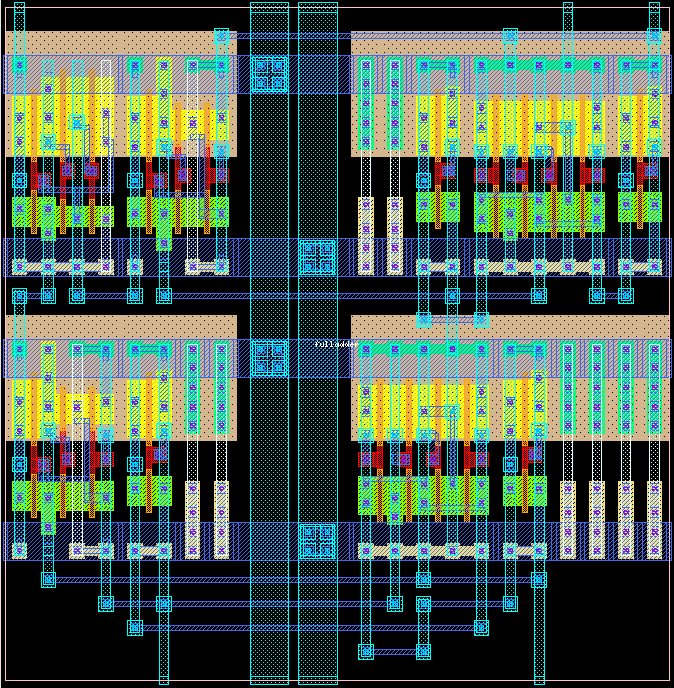
|
| Figure 10. Flattened layout of the full adder. |
|---|
This completes the design of the full adder's core.
|
|
Until now all the files describe the circuit only as symbolic cells. The foundry
requires the layout of the core described in terms of rectangles and layers in
the gds or cif format. This can be done in Alliance using s2r;
the goal of s2r is to perform the translation from the symbolic layout to
physical layout for the foundry. It uses a technology file whose name is defined
by the environnement variable RDS_TECHNO_NAME.
More information on s2r is available in the man pages ( |
|
|
s2r -v fulladder fulladder
-v - verbose mode on first fulladder - |
This invocation will produce the full adder real layout from the standard cell
library without connectors, in cif format (fulladder.cif).
The following is typically displayed.
|
|
[orion]% s2r -v fulladder fulladder

                                      @@@@
                                     @   @@
                                    @@    @@
                            @@@@@@  @@@   @@ @@@ @@@
                           @@    @   @   @@   @@@  @@
                           @@@           @    @@   @@
                            @@@@        @     @@
                              @@@@     @      @@
                           @    @@@   @    @  @@
                           @@    @@  @@@@@@   @@
                           @ @@@@@  @@@@@@@  @@@@

                        Symbolic to Real layout converter

                  Alliance CAD System 3.2b,             s2r 3.6
                  Copyright (c) 1991-1998,       ASIM/LIP6/UPMC
                  E-mail support: alliance-support@asim.lip6.fr


        o loading technology file : /usr/local/alliance/archi/Linux_elf/etc/cmos_7.rds
        o loading all level of symbolic layout : fulladder
        o removing symbolic data structure
        o layout post-treating with connectors, with scotchs.
        --> post-treating model a2_y
            rectangle merging :
        --> post-treating model n1_y
            rectangle merging :
        --> post-treating model tie_y
            rectangle merging :
        --> post-treating model annup_y
            rectangle merging :
        --> post-treating model o2_y
            rectangle merging :
        --> post-treating model fulladder
            ring flattenning  :
            rectangle merging :
        o saving fulladder.gds
        o memory allocation informations
        --> required rectangles = 0  really allocated = 0
        --> required scotchs = 0  really created = 0
        --> Number of allocated bytes: 37282
[orion]%
|
fulladder.cif, we use dreal.
|
|
dreal
|
|
|
A new window is opened. Choose the File menu from the menu bar and choose
the open option from the menu that pops up. Another sub window inside the
main window will be opened. In this window the files with the extension
.cif will be listed. Choose the fulladder.cif file and
press the ok button. The layout will appear on the screen, but only at
the standard cell level:
|
|
|
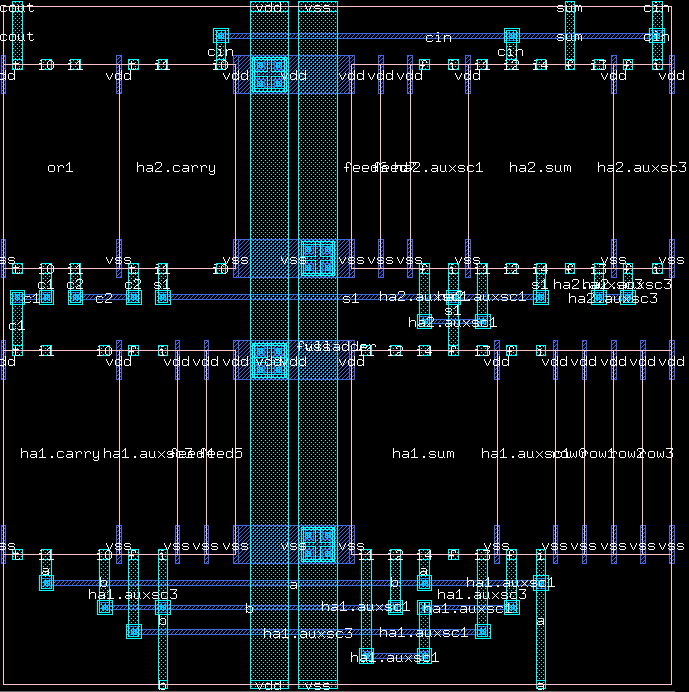
|
| Figure 11. Real layout of the full adder. |
|---|
|
|
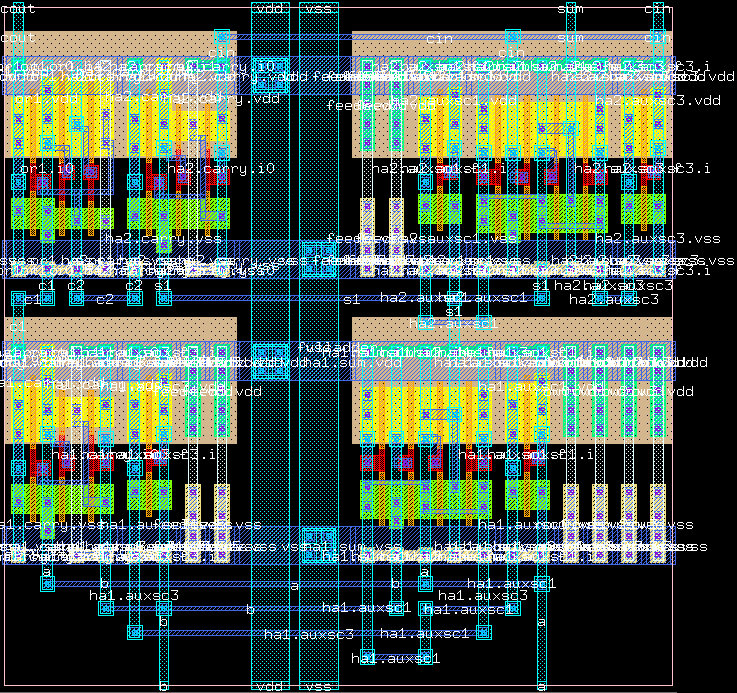
Now you can choose the Tool option from the menu bar and from the pop-up menu choose the Flatten option. Typically you will see the layout as shown below: |
|
|
|
| Figure 12. Real (flattened) layout of the full adder. |
|---|
This completes the design of the 1-bit full adder core.